Configure parallelism for Ray Data LLM
Configure parallelism for Ray Data LLM
This guide explains how Ray Data LLM parallelism parameters affect your cluster resource allocation. Understanding these relationships helps you configure your workload to match your available GPU and CPU resources. For throughput optimization strategies, see Optimize throughput for Ray Data LLM batch inference.
Preprocessing task distribution
Control preprocessing parallelism by adjusting the number of blocks in your dataset before applying the LLM processor. More blocks enable more parallel processing across your preprocessing workers. You can predict the number of rows with:
rows_per_preprocessing_block = dataset_size / num_desired_blocks
You can manually repartition your dataset with repartition():
# Read data
ds = ray.data.read_json("/data.json")

# Apply transformations
ds = ds.map(custom_transform)

# Repartition before LLM processing to increase preprocessing parallelism
ds = ds.repartition(num_blocks=256)

# Apply LLM processor
processed = processor(ds)
If your LLM processor immediately follows reading your dataset, you can use override_num_blocks directly:
# Create more blocks for better preprocessing parallelism
ds = ray.data.read_json(
    ...
    override_num_blocks=128  # Creates 128 output blocks
)
processed = processor(ds)
Ray Data LLM distributes post-processing tasks to your post-processing workers after the inference stage completes. The number of post-processing tasks equals the number of inference tasks. See Adjust inference task distribution to learn how to estimate this number.
Customize map parameters (advanced)
You can further customize preprocessing and post-processing tasks with the preprocess_map_kwargs and postprocess_map_kwargs parameters of build_processor. These arguments follow the same interface as the Ray Data map() function. For more details, see the Ray Data map() API documentation.
processor = build_processor(
    ...
    preprocess_map_kwargs={
        ...
    },
    postprocess_map_kwargs={
        ...
    },
)
Ray Data LLM automatically optimizes compute parallelism for both preprocessing and post-processing stages. Adjust these settings only if you have a strong understanding of Ray Data LLM internals.
Inference stage
The inference stage runs your inference workers to process prompts and generate completions. Ray Data LLM creates independent inference workers that run in parallel, each loading a complete copy of the model and managing its own GPU memory. You can configure both the number of workers and how Ray Data distributes tasks to them.
Adjust inference task distribution
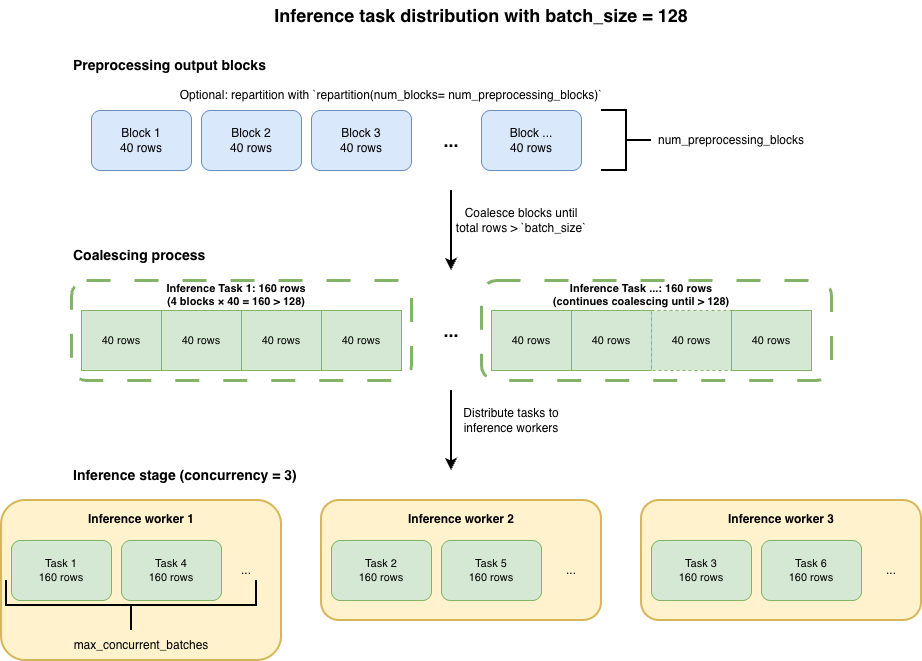
Ray Data LLM coalesces output blocks from the preprocessing stage to create inference tasks. You can control how many rows go into each inference task with batch_size and how many tasks queue per worker with max_concurrent_batches.
Configure batch size
The batch_size parameter controls the target number of rows per inference task:
config = vLLMEngineProcessorConfig(
    ...
    batch_size=32,  # Target rows per inference task
)
Because Ray Data LLM coalesces blocks until the row count surpasses batch_size, each inference task contains a number of rows that's a multiple of the preprocessing output block size, not exactly batch_size.
You can predict the number of rows per inference task with:
rows_per_inference_task = ceil(batch_size / rows_per_preprocessing_block) × rows_per_preprocessing_block
Where rows_per_preprocessing_block comes from your preprocessing stage:
rows_per_preprocessing_block = dataset_size / num_preprocessing_blocks
To estimate the total number of inference tasks created:
Number of inference tasks ≈ dataset_size / rows_per_inference_task
To determine how many parallel tasks Ray Data LLM distributes across your inference workers:
Tasks per worker ≈ Number of inference tasks / concurrency
Queue multiple batches per worker
The max_concurrent_batches parameter allows multiple tasks to queue simultaneously in each worker's input queue, reducing idle time between task processing:
config = vLLMEngineProcessorConfig(
    model_source="meta-llama/Llama-3.1-8B-Instruct",
    batch_size=128,
    max_concurrent_batches=8,  # Up to 8 tasks can queue per worker
)
While one batch processes, the next batch is already loaded and waiting in the queue, reducing idle time and improving GPU utilization. Higher values of max_concurrent_batches help when batch sizes are small and processing time per task is short. Lower values suffice for large batches with longer processing times.
Adjust worker parallelism
Configure the number of inference workers based on your throughput requirements, available GPUs in your cluster, and cost constraints.
The concurrency parameter controls how many independent workers run simultaneously.
config = vLLMEngineProcessorConfig(
    ...
    concurrency=4, # 4 independent workers
)
You can combine worker parallelism with model parallelism. Ray Data LLM automatically allocates the right number of GPUs for each worker.
Configure model parallelism by passing arguments to your vLLM inference engine through the engine_kwargs parameter. For details on selecting GPUs for model parallelism and understanding tensor vs pipeline parallelism trade-offs, see Parallelism strategies for multi-GPU deployments. For vLLM-specific configuration options, see the vLLM documentation.
Autoscaling workers
You can enable autoscaling by setting concurrency to a tuple (min, max). Ray Data LLM monitors worker input queues and scales up between these bounds when tasks accumulate, then scales down when queues empty.
config = vLLMEngineProcessorConfig(
    model_source="meta-llama/Llama-3.1-8B-Instruct",
    accelerator_type="L4",
    concurrency=(1, 4),  # Scale between 1 and 4 inference workers
)
# GPU usage: 1 to 4 GPUs depending on workload
This configuration is useful when dataset size varies across different jobs, ensuring you don't over-provision resources when processing smaller datasets.
Anticipate resource allocation
Estimate the total compute resources needed for your workload and ensure you have sufficient capacity in your cluster. For more details on configuring and estimating your compute needs, see GPU allocation by Ray Data LLM.
Choose GPUs based on your model size, performance requirements, and whether you need model parallelism. For guidance, see Choose a GPU for LLM serving.