GPU memory requirements
GPU memory requirements
This guide helps you understand GPU memory requirements for Ray Data LLM batch inference and configure your deployment to avoid out-of-memory errors.
How the inference engine allocates GPU memory
For a walkthrough of vLLM's memory allocation sequence with examples, see How does vLLM allocate GPU resources?.
Model weights are static and scale with model size and precision (FP32/BF16/FP8). KV cache and activations are dynamic, scaling with context length and concurrent sequences. Framework overhead is static, typically negligible compared to the rest. Based on available KV cache memory, vLLM derives concurrency limits for simultaneous sequences.
GPU memory utilization
The gpu_memory_utilization parameter controls the fraction of total GPU memory that the vLLM inference engine can use.
Memory visible to vLLM = (Total GPU memory × gpu_memory_utilization)
from ray.data.llm import vLLMEngineProcessorConfig

config = vLLMEngineProcessorConfig(
    model_source="meta-llama/Llama-3.1-8B-Instruct",
    engine_kwargs={
        "gpu_memory_utilization": 0.90,  # Default value
    },
)
You can adjust this parameter to limit the inference engine's GPU memory usage. For example, set it to 0.45 if you want to deploy two separate model instances on the same GPU, each using roughly half of the available memory. Or set it lower (0.70-0.80) when system-level GPU processes such as ECC overhead aren't detected by vLLM or nvidia-smi, preventing memory over-allocation and OOM errors.
Never use 1.0. Always leave a buffer for unexpected allocations. vLLM can crash if it runs out of memory during execution.
Model memory allocation
Model weights are the largest static allocation in GPU memory. The memory requirements from the inference engine scale with model size and depend on how you deploy the model. Common strategies include:
- Model parallelism: Splits a model across multiple GPUs using model parallelism, reducing per-GPU memory requirements. For details on selecting parallelism strategies, see Parallelism strategies for multi-GPU deployments.
- Quantization: Uses lower precision formats such as FP8 to reduce model weight memory by approximately 50% compared to BF16. For guidance on configuring quantization for batch inference, see Quantization for LLM batch inference.
- Multi-LoRA: Loads a base model once and swaps lightweight adapter weights instead of loading entirely separate models, reducing memory when serving multiple model variants.
Key-value cache allocation
The KV cache stores attention keys and values for active sequences. This is the most dynamic component of GPU memory and typically the limiting factor for concurrency. For an introduction to KV caching concepts, see Key-value (KV) caching.
vLLM calculates available KV cache memory using this formula:
KV cache memory = (Total GPU memory × gpu_memory_utilization)
                  - Model weights
                  - Peak activations
                  - Framework overhead
vLLM organizes KV cache into memory blocks, with each block storing KV values for a fixed number of tokens. For each token in a sequence, the KV cache stores key and value tensors for every attention layer in the model. The memory required scales with the number of layers in the model and the number of sequences that the inference engine processes.
KV cache memory requirements mainly depend on the number of concurrent sequences max_num_seqs your inference engine processes, their length, and the number of layers in your model. More concurrent sequences and larger models require more KV cache memory.
For details on tuning engine parameters for throughput and their trade-offs, see Optimize throughput for Ray Data LLM batch inference.
Activation memory allocation
Activation memory stores intermediate tensors computed during the forward pass through the model. Unlike model weights (static) or KV cache (grows with sequences), activation memory spikes during computation and clears afterward.
Peak activation memory scales with both model size and the number of tokens processed in a single forward pass. During the prefill phase, the inference engine processes multiple tokens at once to populate the KV cache, and need to store temporary activation values. The max_num_batched_tokens parameter controls this prefill batch size, directly impacting peak activation memory.
config = vLLMEngineProcessorConfig(
    model_source="meta-llama/Llama-3.1-8B-Instruct",
    engine_kwargs={
        "max_num_batched_tokens": 8192,  # Controls tokens per prefill step
    },
)
Activation memory is a greater concern for larger models (>100B parameters) that produce larger intermediate tensors.
Larger values process more tokens per step, increasing throughput but requiring more peak memory. Smaller values reduce memory spikes but may decrease throughput.
GPU allocation by Ray Data LLM
Ray Data LLM orchestrates resource allocation across preprocessing, inference, and post-processing stages, and executes them in parallel. Understanding how Ray Data allocates resources helps you configure your cluster appropriately, see Configure parallelism for Ray Data LLM for details on configuring compute parallelism for your workload.
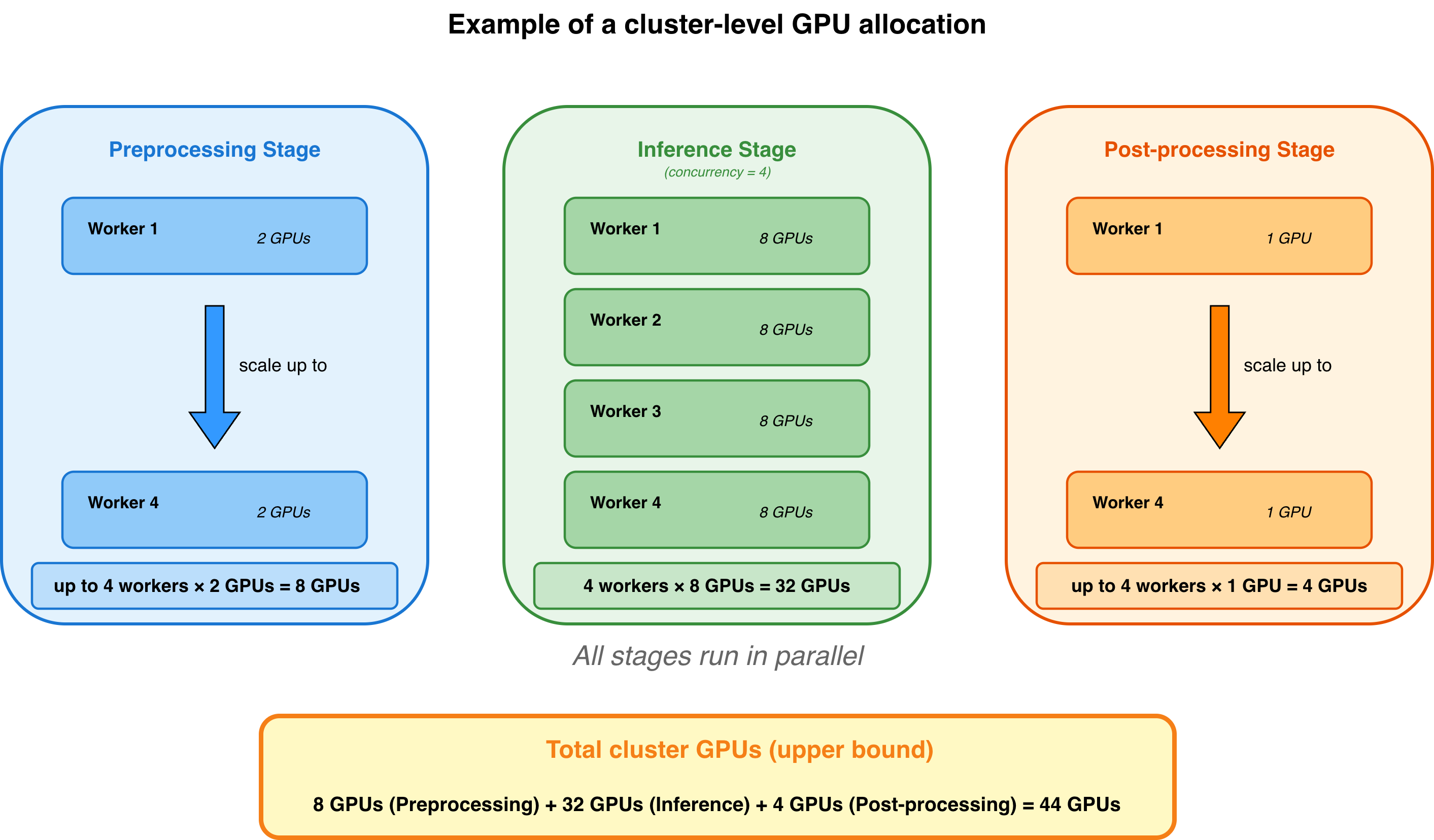
You can estimate an upper bound of GPU allocation based on your configuration:
Total GPUs allocated = (Preprocessing GPUs × preprocessing workers)
           + (Inference GPUs x inference workers)
           + (Post-processing GPUs × post-processing workers)
Actual GPU consumption may be lower because tasks can share resources once previous tasks complete, and you can use fractional GPU resources to pack multiple tasks on the same GPU.
GPU allocation for inference workers
Ray Data LLM creates inference engine workers according to your concurrency parameter and allocates GPUs for each inference worker. Each worker needs GPU memory sufficient for one complete vLLM engine instance. See How the inference engine allocates GPU memory.
When using model parallelism, each worker spans multiple GPUs:
config = vLLMEngineProcessorConfig(
    model_source="deepseek-ai/DeepSeek-R1",
    accelerator_type="H100", # Ray Data LLM looks for H100 in your cluster
    engine_kwargs=dict(
        pipeline_parallel_size=2, # Split model layers across 2 nodes
        tensor_parallel_size=8, # Split each model layer across 8 GPUs
        distributed_executor_backend="ray", # Required to enable cross-node parallelism
    )
    concurrency=4, # Ray Data LLM creates 4 workers
)
# GPUs per inference worker: 2 × 8 = 16 GPUs per inference worker
# Total GPUs = 4 × 16 = 64 GPUs
Total GPUs = concurrency × (tensor_parallel_size × pipeline_parallel_size)
When you enable autoscaling with concurrency=(min, max), Ray Data dynamically scales workers based on workload demand, allocating GPUs as tasks grow and freeing them as workload decreases. Ray Data ensures sufficient GPU memory before initializing workers; if insufficient memory is available, initialization fails with OOM errors.
If your preprocessing or post-processing steps also require GPU compute, make sure to allocate additional GPU resources beyond your inference stage needs. See GPU allocation for preprocessing and post-processing to calculate preprocessing and post-processing compute requirements.
GPU allocation for preprocessing and post-processing
Ray Data LLM allows you to configure compute resources for custom preprocessing and post-processing steps. You specify these through preprocess_map_kwargs and postprocess_map_kwargs in the build_processor() function.
from ray.data.llm import build_processor

processor = build_processor(
    ...
    preprocess=custom_preprocessing_function,
    postprocess=custom_post_processing_function,
    preprocess_map_kwargs={
        "num_cpus": 8,     # Reserve 8 CPUs per preprocessing worker
        "num_gpus": 0.5,  # Reserve half a GPU per preprocessing worker
    },
    postprocess_map_kwargs={
        "num_gpus": 1,  # Reserve 1 GPU per post-processing worker
    },
)
These arguments follow the same interface as the Ray Data map() function. For more details, see the Ray Data map() API documentation.